
Tax Threshold Limits
Managing Sales Threshold Limits in SyncTools
_
As your eCommerce business grows, staying on top of your tax obligations becomes increasingly important. SyncTools’ Threshold Limit feature is designed to help Shopify merchants like you avoid unexpected tax liabilities by proactively alerting you when your sales reach important thresholds in different countries or states.
The first time I crossed a sales threshold in California without realizing it, I ended up with unexpected tax obligations. SyncTools’ notifications would have saved me hours of accounting headaches!_
Why Threshold Limits Matter
When selling across multiple states or countries, each jurisdiction has different rules about when you need to register for tax collection. SyncTools helps you:
-
Stay ahead of tax compliance requirements
-
Avoid unexpected tax penalties
-
Make informed decisions about where to expand your business
-
Manage your accounting workflow more efficiently
__
Setting Up Country-Based Threshold Limits
-
Navigate to the Settings section in your SyncTools dashboard
- Click on Countries under the Configuration section
_
TIP: Set up your operating countries before configuring threshold limits to ensure all relevant jurisdictions are covered.

Note: The countries you select here will determine which threshold limits you can configure in the next steps.
Once you’ve selected your operating countries, you can set specific threshold limits:_
-
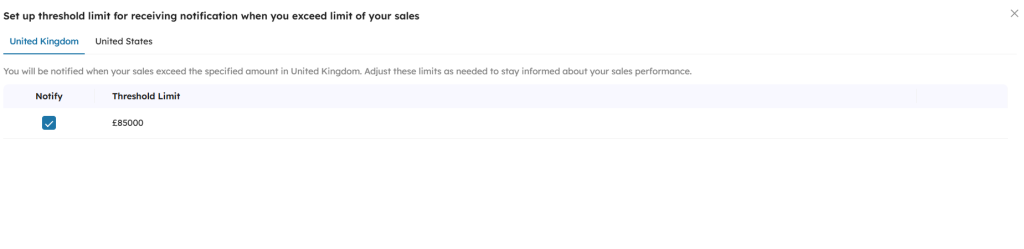
Click the _ Set threshold limit _ button located in the upper right corner
-
Select the country tab you wish to configure (e.g., United Kingdom or United States)
__
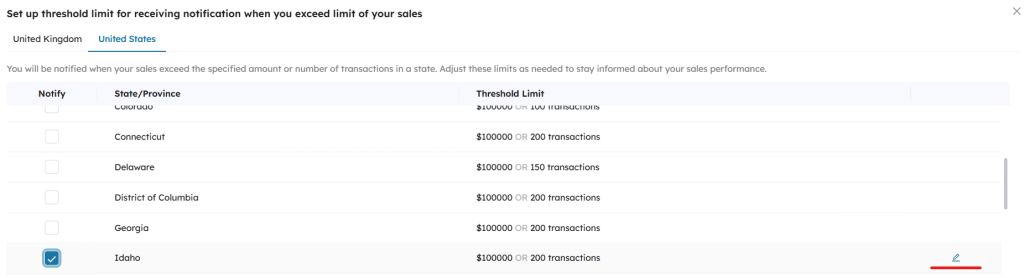

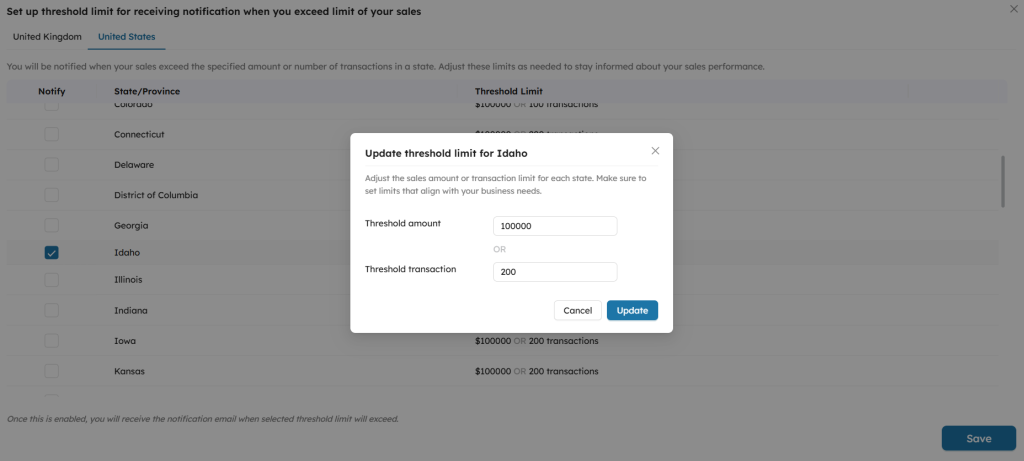
PRO TIP: Research current tax nexus thresholds for each state before setting your limits. Economic nexus thresholds change periodically, so check with your accountant for the most current information.
How Notifications Work
Once your threshold limits are configured, SyncTools will monitor your Shopify sales data as it’s synchronized with QuickBooks. When your sales in a particular region approach or exceed your set threshold:
- You’ll receive an email notification alerting you to the threshold crossing
- The notification will specify which country/state threshold has been reached
- You can then consult with your tax professional about any required filings
IMPORTANT: Threshold notifications are informational only. Always consult with a tax professional about your specific tax obligations.
Was this article helpful?