
Returns, Refunds & Fees
Advanced Accounting with SyncTools: Managing Shopify Transactions in QuickBooks
Running an online store on Shopify is exciting, but the accounting side can quickly become overwhelming. Imagine receiving dozens of orders daily, each with products, shipping fees, taxes, and occasional tips or refunds. Now imagine manually entering each of these into QuickBooks—it would be a bookkeeper’s nightmare!
That’s where SyncTools steps in. We’ve designed our platform to transform the complex web of Shopify transactions into clean, organized QuickBooks entries that make sense to both business owners and accountants.

TIP: Think of SyncTools as your virtual bookkeeper that works 24/7, never takes a vacation, and follows accounting best practices with perfect consistency.
The Journey of a Transaction: From Checkout to Financial Statements
Let’s follow the journey of a typical transaction through your system when using SyncTools:
Meet Sarah, a customer who just discovered your Shopify store. She purchases a makeup kit for $25 and a t-shirt for $10, pays $20 for shipping, gets a $1 discount, and is charged $2.04 in sales tax. Her total comes to $56.04, which she pays through Apple Pay.
In Shopify, this order (#1006) looks straightforward. But behind the scenes, this single transaction needs to be broken down into multiple accounting components.
When Refunds Happen
A week later, Sarah decides the makeup kit and t-shirt aren’t right for her and requests a refund. In Shopify, you process the full refund of $56.04. This is where many e-commerce businesses make accounting mistakes—a refund isn’t just “reversing a sale”; it requires proper accounting treatment to maintain accurate records.
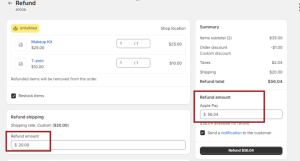
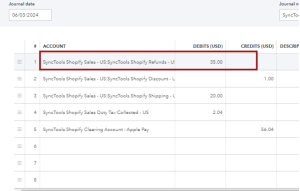
SyncTools handles this refund by creating the perfect countering entry:
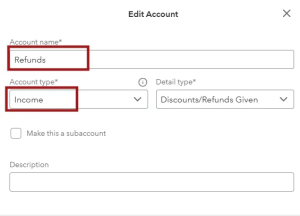
This entry properly categorizes each component of Sarah’s purchase, ensuring your financial reports will accurately reflect your business performance.
How Sales Tax is Managed:
For many online sellers, sales tax can be particularly confusing. You’re collecting it from customers in various jurisdictions, but it’s not your money—you’re essentially acting as an intermediary between your customer and the tax authority.
Let’s look at James from California who orders from your store. The 6% state tax on his purchase amounts to $2.04. This is what happens behind the scenes with SyncTools:
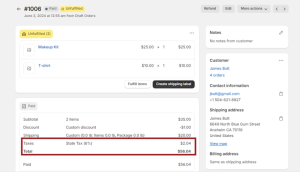
SyncTools creates an entry that puts this amount in a liability account, not revenue:
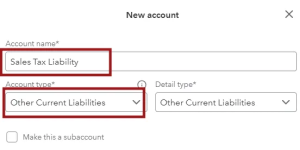
This amount now appears in your liability account, making it easy to see how much tax you’ve collected and need to remit.
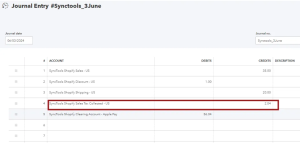
If James gets a refund, SyncTools reduces the tax liability accordingly.Tracking Tips : For businesses that receive tips through Shopify, proper accounting is essential. Let’s see how SyncTools handles this unique type of transaction.
Understanding Tips as a Liability
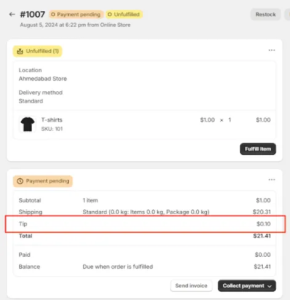
Imagine a customer adds a $0.10 tip to their order. This money isn’t your revenue—it belongs to your staff. Until you pay it out, it’s a liability on your books.
SyncTools generates an entry that credits the “Tips Liability” account:
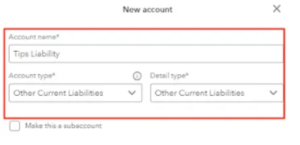
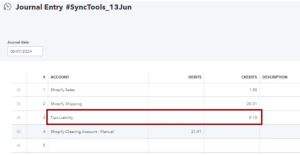
This approach ensures tips are never accidentally counted as business revenue and provides a clean audit trail for tip collection and distribution.
Return Fees: Turning Returns into Revenue Opportunities
Let’s say a customer returns a $9 item but is charged a $1 return shipping fee and a $0.02 restocking fee.
SyncTools handles this complex transaction by:
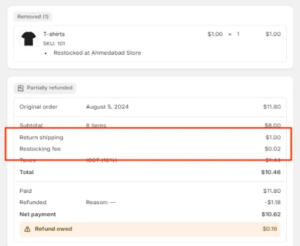
The return fees are treated as new revenue, not as a reduction of the refund.
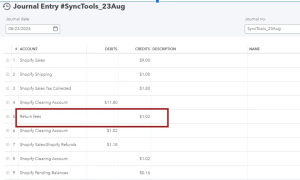
This approach gives you visibility into how much revenue you’re generating specifically from return fees.Still have questions? Our support team is ready to help at support@synctools.ai, or visit our Help Center for additional guides.
Was this article helpful?