
Reconcile Payouts
Reconciling Shopify Payouts with Bank Transactions using SyncTools
As an eCommerce business owner, you’ve likely experienced that end-of-day moment when you need to match what’s in your Shopify account with what’s actually hit your bank account.
It’s a bit like trying to match socks after doing laundry – you know they should pair up, but sometimes it’s not as straightforward as it seems!
SyncTools transforms this potentially frustrating process into a smooth, automated journey.
Let’s walk through how your Shopify payout data travels from your store to your QuickBooks account, making reconciliation a breeze rather than a burden.**“Before using SyncTools, I spent hours every week manually reconciling Shopify payouts.
Now it takes me less than 5 minutes to match everything perfectly.”**– Sarah, Boutique Owner
How SyncTools Creates Perfect Reconciliation
###Step 1: The Payout Arrives Your Shopify store has been busy, and a payout has been processed. Shopify has deposited $13.00 into your bank account.
This represents your sales, minus fees, plus shipping, adjusted for discounts – all combined into one deposit.>
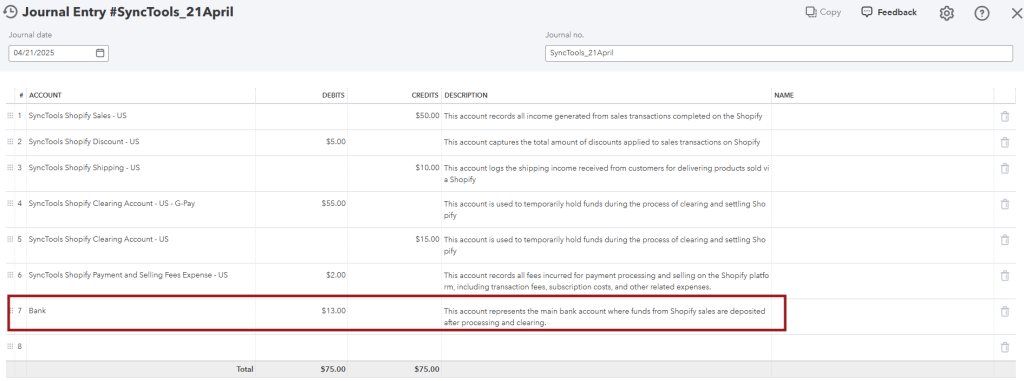 Step 2 : One Click Reconciliation When you log into QuickBooks and navigate to the “Bank transactions” section, you’ll see your $13.00 deposit waiting to be categorized.
But here’s where the SyncTools difference becomes clear.
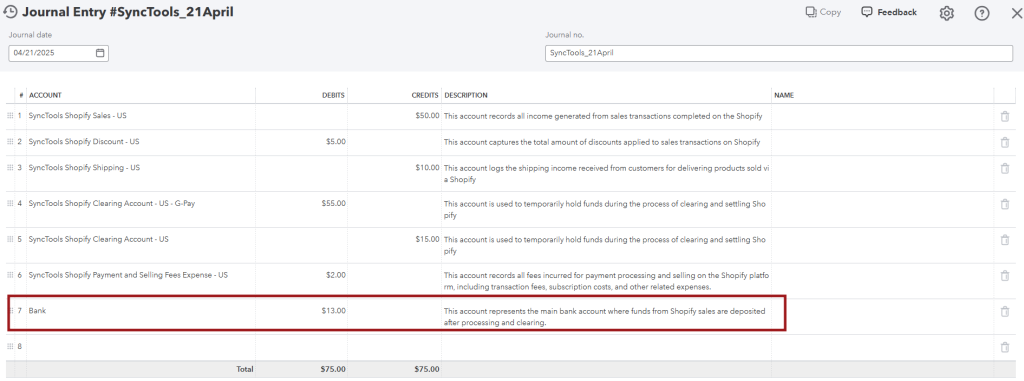
Instead of having to manually allocate this deposit to various income and expense accounts, QuickBooks already shows “1 match found” – linking directly to the SyncTools journal entry!
With a single click on “Match,” your reconciliation is complete.
The bank transaction is perfectly matched to your SyncTools journal entry, with all the detailed categorization already done for you.

TIP: This one-click reconciliation eliminates the most time-consuming part of eCommerce bookkeeping, giving you more time to focus on growing your business.
Was this article helpful?