
Purchase Order Tax Sync
Simplify your purchase order management with Linnworks and Xero's PO Tax Exclusive Sync feature. Ensure consistent tax handling by converting all purchase orders to tax exclusive, reducing manual adjustments, and improving accounting accuracy.
When dealing with tax-inclusive or tax-exclusive pricing, it’s important to know how taxes are applied to the product or service you’re purchasing or selling.
Tax Inclusive
In tax-inclusive pricing, the total price already includes the tax. This means the buyer sees the final amount they need to pay, including tax.
Example:
- Unit Cost: £100
- Tax Rate: 20%
The total price for this item will remain £100 because the tax is already included in this price.
- Tax Portion= £100 * (20/120) = £16.67
- Net Price= £100 - £16.67 = £83.33
So, the unit cost of the item without tax is £83.33, and the tax amount is £16.67.
Tax Exclusive
In tax exclusive pricing, the total price does not include the tax.
The tax is calculated and added on top of the unit price at the time of purchase.
Example
- Unit Cost: £100
- Tax Rate: 20%
The total price the buyer will pay is the unit cost plus tax.
- Tax Portion= £100 * 20% = £20
- Total Price= £100 + £20 = £120
So, the buyer will pay £120, with £100 as the unit cost and £20 as the tax.
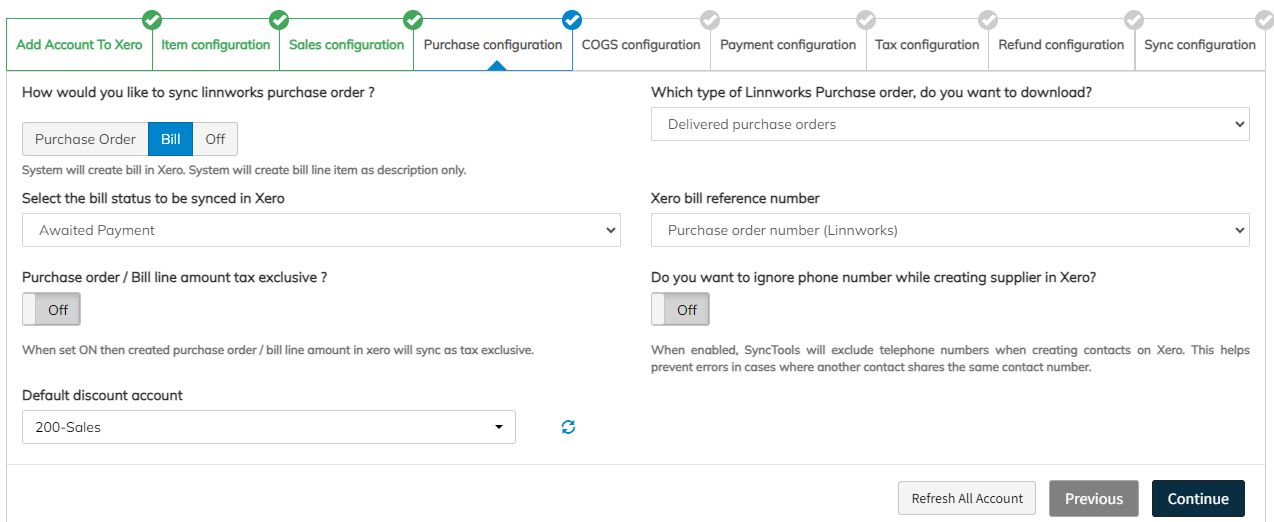
Feature Overview: PO Tax Exclusive Sync Purpose
This feature is designed to help businesses streamline how purchase orders (POs) are handled when syncing with Xero.
Whether your POs in Linnworks are set as tax-inclusive or tax-exclusive, this feature ensures that all POs are treated as tax-exclusive when synced to Xero.
How It Works
When you enable the PO Tax Exclusive toggle button, the system will automatically sync all POs as tax exclusive to Xero, regardless of their original tax settings in Linnworks.
Benefits
- Ensures consistency in tax reporting and accounting.
- Reduces manual adjustments when exporting POs to Xero.
- Simplifies financial records and improves accuracy.
Feature Workflow
- Create PO in Linnworks (either as tax inclusive or tax exclusive).
- Turn on the PO Tax Exclusive toggle in SyncTools.
- Upon sync, all POs will be converted to tax exclusive in Xero.
In Xero, the tax will be added separately to the PO amount, ensuring a clear breakdown of the item cost and tax.
By using this feature, you’ll enjoy a more standardized process, ensuring your purchase orders are handled consistently when syncing across systems.
Testing Scenario: PO Tax Exclusive Feature
Let’s walk through a real-world example to understand the impact of this feature.
Scenario
-
Inventory Item Created You created an inventory item with a purchase cost of £100.
-
Purchase Order Created You create a Purchase Order(PO29082444535) in Linnworks for 10 units of this product, with a 20% tax rate, and you choose the tax inclusive format.
This means the unit cost of £100****includes the tax. The line total will be:£100 (unit cost) x 10 (quantity) = £1,000-Unit Cost Calculation (Tax Exclusive) If we want to calculate the tax exclusive cost, we can use the following formula:
  Tax Exclusive Cost = Total Amount / (1 + Tax Rate)
  - £100 / (1 + (20 / 100))
  - £100 / 1.20 =**£83.33**(approx)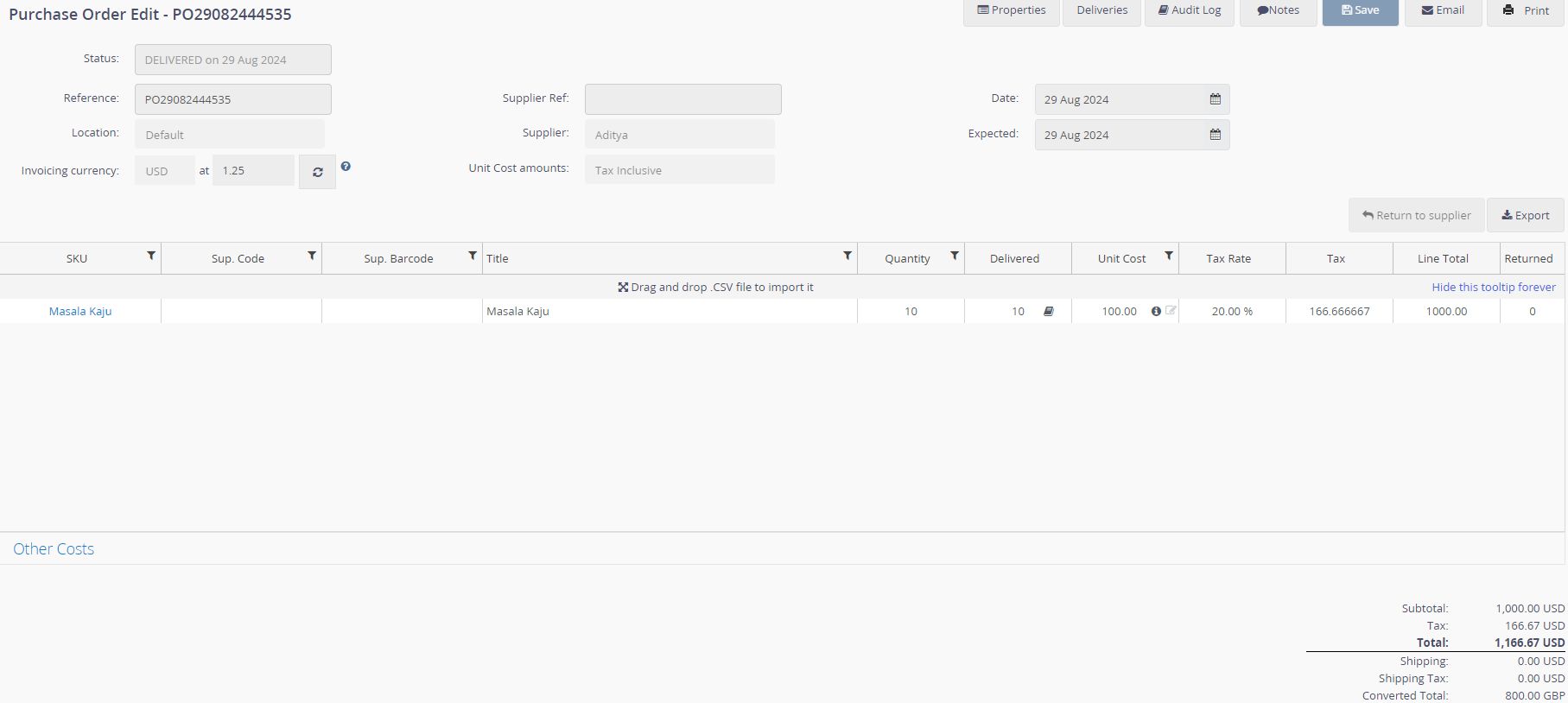
PO29082444535 Delivered Purchase Order.
Turning the Feature OFF
If the PO Tax Exclusive feature is turned off, the purchase order will appear as a Tax Inclusive Purchase Order in Xero.
- Total Line Amount:£1,000
- Tax Portion(already included): £166.67
- Net Price:£833.33
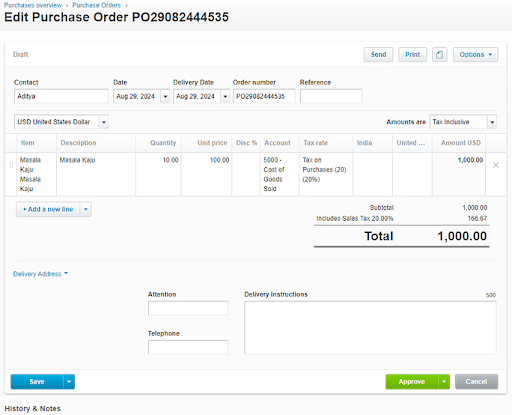
Tax Inclusive Purchase Order.
Turning the Feature ON
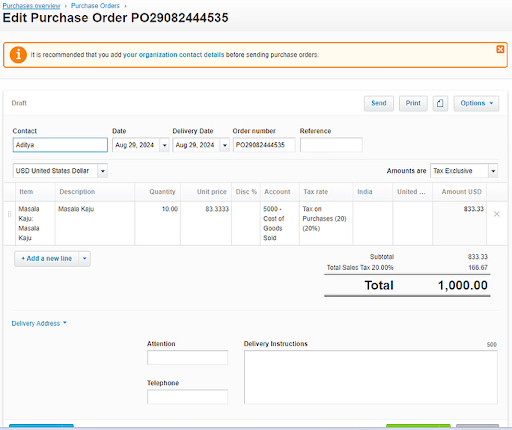
Once the PO Tax Exclusive feature is turned on, the purchase order will appear as a Tax Exclusive Purchase Order in Xero. Here’s what happens:
- The unit cost of £100(which included tax) will now be considered tax exclusive, meaning the tax will be added on top of this amount.
Tax Exclusive Total:
- Line Total:£833.33
- Tax:£166.67
- Total Price:£1,000 (with tax added separately)
Was this article helpful?