
Inventory Item Creation
SyncTools now supports automatic creation of inventory items in Xero, streamlining your stock management. Easily sync items from Linnworks with options for non-inventory or inventory creation, ensuring a more robust and efficient integration.
SyncTools now offers a brand-new feature: the ability to create items as inventory in Xero! Previously, only non-inventory item creation was available.
With this enhancement, SyncTools will automatically create inventory items in Xero when an item doesn’t already exist.
Sales Configuration’s Modified Version
Sync Items and Default Inventory Account Selection Option
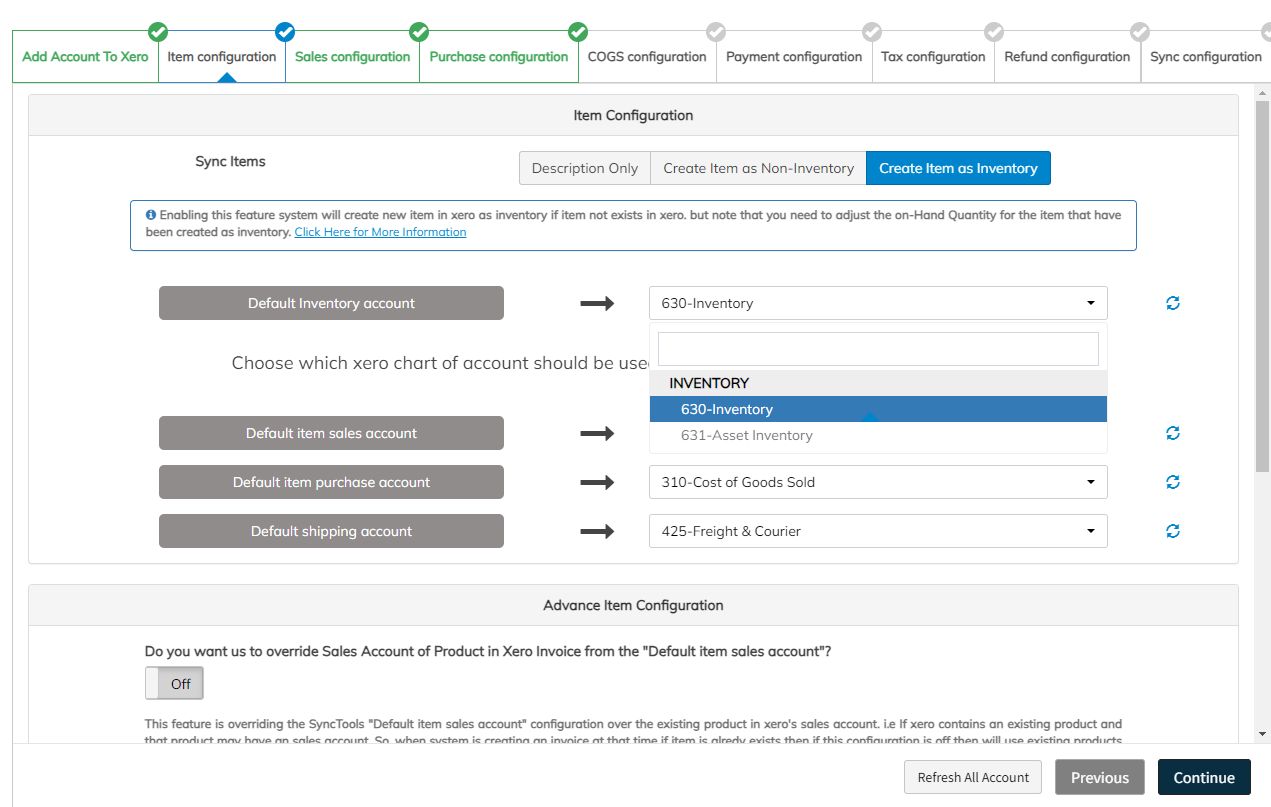 Feature Overview: Inventory Item Creation
When does this feature activate?
By default, this feature will behave as before, creating items as non-inventory unless you specify otherwise.
To create items as inventory, you need to click the “Create as Inventory” button from the button group:
Options Available
- Description Only-Create as Non-Inventory-Create as Inventory Once “Create as Inventory” is selected, any new item(not already in Xero) will be created as an inventory item.
Quantity on Hand – How It’s Managed
API Limitation
Currently, Xero’s API does not provide a way to adjust the Quantity on Hand when creating inventory items.
As a result, SyncTools does not modify this field upon item creation.Note: You will need to manage this field manually in Xero.
Automatic Adjustments
The Quantity on Hand in Xero updates automatically in the following cases:Increase: When you create an approved Bill(status: Awaiting Payment or Paid).
- Decrease: When you create an approved Invoice(status: Awaiting Payment or Paid).
Scenario: Configuring an Item as Inventory
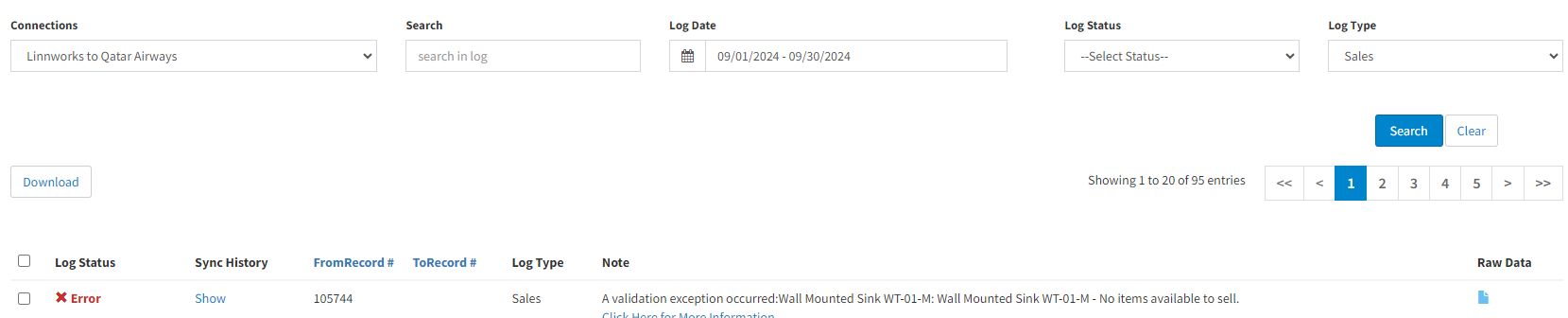
If you configure an item as inventory and attempt to create an Invoice in the “Awaiting Payment” status, you may encounter an error like this:**Error: “No item available to sell”**No item available to sell
What Does This Error Mean?
This error indicates that there is an inventory item in Xero for the invoice, but the Quantity on Hand is set to zero.
Xero will not allow you to sell an inventory item if the stock is zero.
Solution
You can fix this in one of the following ways:
- Manually adjust the quantity of the item SKU (as shown in the error message) in Xero.
- Create a Purchase Order (PO) in Linnworks and deliver it.
Once delivered, the PO will sync to SyncTools, where you can configure it to create a Bill in the “Awaiting Payment” status.
- Once this Bill is created, the Quantity on Hand for the item will increase based on the PO amount.
Now, when you create an Invoice in Xero, the stock will be available, and the invoice can be uploaded successfully.
For manually adjusting the quantity in Xero
Important Considerations
Pre-existing Items in Xero
If an item already exists in Xero as a non-inventory item, SyncTools will not update this item to an inventory item.Note: If you wish to change an item from non-inventory to inventory, you must make this change manually in Xero and adjust the Quantity on Hand accordingly.
Conclusion
The new inventory item creation feature streamlines the process of managing stock in Xero directly from Linnworks.
However,managing stock levels remains a manual task until an invoice or bill is processed.
This feature saves time by auto-creating items, but oversight of inventory levels is essential to avoid errors.
With these improvements,SyncTools offers a more flexible and robust integration for users managing both non-inventory and inventory items.
Was this article helpful?