The Best Shopify to QuickBooks Integration Apps of 2026
The right Shopify to QuickBooks integration app eliminates manual data entry and keeps your books accurate as order volume grows. Here are the top options for 2026.
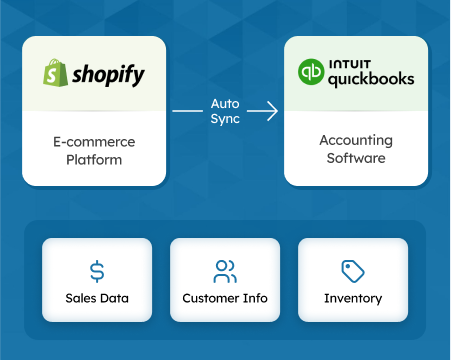
Shopify does not natively sync to QuickBooks Online. You need a third-party integration app to move transactions, fees, refunds, taxes, and payout data across automatically. The right tool saves several hours of bookkeeping per month and prevents the most common eCommerce accounting errors — recording net payouts as gross revenue, missing Shopify Payments fees, and mis-categorizing sales tax.
TL;DR: The best Shopify to QuickBooks integration must do four things correctly: separate gross sales from Shopify fees, exclude collected sales tax from income, handle refunds as credit memos, and reconcile payouts to bank deposits. SyncTools does all four and starts free — paid plans from $19/month.
This guide compares the best Shopify to QuickBooks integration apps available in 2026, with a focus on accounting accuracy rather than just feature count.
What to Look For in a Shopify QuickBooks Integration
Before comparing tools, confirm any integration you consider handles these four requirements correctly:
- Gross-to-net revenue separation — Shopify pays out a net amount after deducting fees, refunds, and sometimes tax. A correct integration posts gross sales as revenue and records fees and refunds separately. Recording the net payout as revenue understates gross income and overstates margins.
- Sales tax exclusion — If Shopify collects tax on behalf of the customer, that tax is a liability, not income. Your integration must post collected sales tax to a tax payable account, not to a revenue account.
- Payout reconciliation — Each Shopify Payments deposit to your bank covers multiple days of orders, fees, and refunds. The integration should produce QuickBooks entries that tie out to each bank deposit exactly.
- Refund handling — Refunds must post as credit memos or contra-revenue entries, not as negative invoices, to avoid distorting sales reports.
For a deeper breakdown of these mechanics, see the Shopify payout reconciliation in QuickBooks guide and the Shopify sales tax in QuickBooks guide.
Comparison Table: Top Shopify to QuickBooks Apps (2026)
| App | Starting Price | Sync Method | Per-Order & Summary | COGS Sync | Free Trial |
|---|---|---|---|---|---|
| SyncTools | $19/month | Real-time or daily | Both | Yes | Yes (no CC) |
| Webgility | $49/month | Daily batch | Both | Yes | Yes |
| Connex | $49/month | Daily batch | Both | No | Yes |
| QuickBooks Commerce | $39/month | Native (Intuit) | Summary only | Limited | No |
1. SyncTools — Best for Accounting Accuracy
Price: Starts at $19/month · Free trial available (no credit card required)
SyncTools is built specifically for eCommerce accounting. It posts gross sales, Shopify Payments fees, refunds, discounts, shipping income, and tax collected to separate QuickBooks accounts — so your P&L reflects what actually happened, not just what Shopify paid out.
Key capabilities:
- Real-time and daily summary sync — Post each transaction individually or as one daily journal entry. Real-time is useful for audit trails; daily summary is cleaner for stores processing hundreds of orders per day.
- COGS sync — Pulls product cost data from Shopify and posts Cost of Goods Sold to a dedicated QuickBooks expense account for accurate gross margin reporting.
- Payout reconciliation — Each Shopify Payments payout maps to a QuickBooks deposit entry that reconciles exactly to your bank statement.
- Multi-store support — Connect multiple Shopify stores to one QuickBooks company file, with each store posting to separate income accounts for channel performance tracking.
- Historical backfill — Standard and Plus plans include up to 2 years of historical data import so your books are complete from day one.
- Error logging — Failed transactions are flagged in the SyncTools dashboard; nothing is silently skipped.
Best for: Shopify sellers who need clean, auditable books and accurate gross margin reporting.
2. Webgility — Best for Multi-Channel Sellers
Price: Starts at $49/month
Webgility syncs Shopify orders to QuickBooks and also supports Amazon, eBay, and WooCommerce from a single dashboard. It handles order syncing, inventory updates, and end-of-month reconciliation across channels.
Strengths: Multi-channel order management, in-depth analytics dashboard, strong reconciliation tools.
Limitations: Higher starting price; setup is more complex for stores that only need Shopify + QuickBooks. For a direct feature comparison, see SyncTools vs. Webgility.
3. Connex for QuickBooks Online — Best for Order-Level Detail
Price: Starts at $49/month
Connex syncs each Shopify transaction individually to QuickBooks Online with detailed per-order records. It suits stores that need transaction-level audit trails in QuickBooks rather than summarized journal entries.
Strengths: Granular per-order sync, customer record sync, simple setup.
Limitations: No COGS sync; payout reconciliation requires manual configuration; pricing is higher relative to order volume for growing stores.
4. QuickBooks Commerce by Intuit
Price: Starts at $39/month
QuickBooks Commerce (formerly TradeGecko, now an Intuit product) provides native QuickBooks Online connectivity with inventory management and B2B wholesale features built in.
Strengths: Native Intuit integration, strong inventory and warehouse management, B2B wholesale channel support.
Limitations: Overkill for stores that only need accounting sync; less granular fee mapping than SyncTools; summarized sync only — no per-transaction posting to QuickBooks.
How to Choose
For most Shopify sellers whose primary need is accurate accounting in QuickBooks, SyncTools is the right choice. It covers the four accounting requirements above, starts at $19/month, and takes 15–30 minutes to configure.
If you sell on multiple channels (Amazon, eBay, WooCommerce) and need a unified order management + accounting platform, Webgility is worth evaluating at higher volume.
If you need native Intuit integration with full inventory management, QuickBooks Commerce fits manufacturing or wholesale-adjacent use cases.
For a detailed walkthrough of the setup process, see the Shopify QuickBooks integration guide and the essential guide to Shopify and QuickBooks.
Frequently Asked Questions
What is the best Shopify to QuickBooks integration app?
SyncTools is the top-rated Shopify to QuickBooks Online integration for eCommerce accounting automation. It syncs gross sales, refunds, taxes, Shopify fees, COGS, and payout settlements to the correct QuickBooks accounts automatically — no CSV exports or manual journal entries required. Setup takes 15 minutes.
Does Shopify connect to QuickBooks Online directly?
Shopify does not have a native QuickBooks Online integration. You need a third-party connector such as SyncTools to sync Shopify transactions to QuickBooks Online. These connectors use both platforms’ APIs to push sales, refunds, taxes, and fees into the correct QuickBooks accounts in real time.
How do I sync Shopify sales to QuickBooks?
Install a Shopify-QuickBooks integration app like SyncTools. Authorize both your Shopify store and QuickBooks Online via OAuth, map your chart of accounts, and run your first sync. SyncTools automatically posts gross sales, Shopify Payments fees, refunds, taxes, and payout settlements to QuickBooks with no manual entry.
Is there a free Shopify to QuickBooks integration?
SyncTools offers a free trial with no credit card required. During the trial you can test the full sync — orders, refunds, fees, taxes, and historical backfill — before committing to a paid plan. Paid plans start at $19/month.
What Shopify data syncs to QuickBooks with SyncTools?
SyncTools syncs: gross order revenue, Shopify Payments transaction fees, refunds and partial refunds, sales tax collected, COGS (cost of goods sold), and Shopify payout settlement amounts. Each item posts to the correct QuickBooks account based on your chart of accounts mapping.
For a detailed comparison of Shopify accounting tools, see the Shopify accounting software guide and the Shopify QuickBooks integration guide.
Related integrations:
- Shopify QuickBooks Online Integration overview — full feature details, pricing, and setup for SyncTools
- Shopify Xero Integration overview — for Shopify merchants using Xero instead of QuickBooks
See the integration page
Shopify QuickBooks Online Connector
Ready to automate your accounting?
Connect Shopify, WooCommerce, or Linnworks to QuickBooks, Xero & more. Setup in minutes.